如何在网站显示当前使用的 Cloudflare 网络
通过解析 Cloudflare 的 /cdn-cgi/trace 接口获取当前网络节点 ID,再结合 Cloudflare Status 的公共 API 匹配出节点名称,从而在网站上动态显示访客正在使用的 Cloudflare 网络名称。
今天凌晨给我的个人网站加了一个小功能,就是在网站显示当前使用的 Cloudflare 网络。
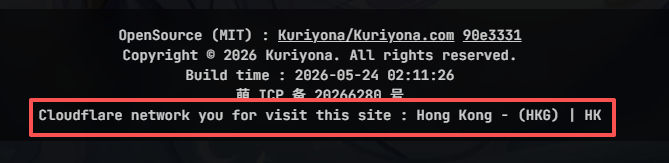
翻到本网站的最底下,您应该就能看见实际显示的样式。
实现方式
由 Cloudflare 代理的网站,通过访问 {domain}/cdn-cgi/trace 可以获取当前使用的 Cloudflare 网络信息。样例如下:
fl=582f239
h=kuriyona.com
ip=64.90.0.218
ts=1779555940.000
visit_scheme=https
uag=Mozilla/5.0 (Windows NT 10.0; Win64; x64) AppleWebKit/537.36 (KHTML, like Gecko) Chrome/149.0.0.0 Safari/537.36 Edg/149.0.0.0
colo=HKG
sliver=none
http=http/3
loc=HK
tls=TLSv1.3
sni=plaintext
warp=off
gateway=off
rbi=off
kex=X25519MLKEM768
通过解析其中的 colo 参数,我们可以获取当前使用的 Cloudflare 网络 ID,比如这里是 HKG。
那么网络 ID 有了,我们就可以根据网络 ID 来显示当前使用的 Cloudflare 网络了。
Cloudflare Status 提供了一个文件,列出了当前所有的 Cloudflare 网络状态信息。
https://www.cloudflarestatus.com/api/v2/summary.json
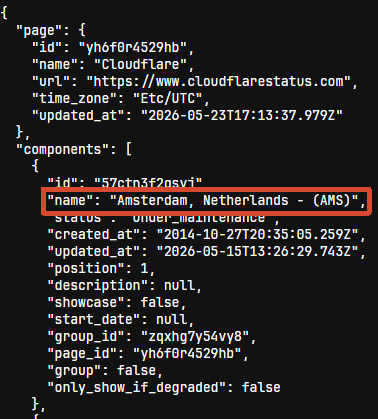
文件的内容很杂,我们需要通过一个简单的脚本来获得我们需要的格式化信息。
首先通过一个简单的正则表达式(^[A-Za-z\s,]+-\s*\(([A-Z]{3})\)$)来筛选复合网络节点的 name 字段,再对数据结构进行简化处理。(这里使用 ky 库来获取数据)
const res = await ky.get('https://www.cloudflarestatus.com/api/v2/summary.json').json();
const result = res.components
  .filter((c) => REGEX.test(c.name))
  .map((n) => ({
    name: n.name,
    code: n.name.match(/^[A-Za-z\s,]+-\s*\(([A-Z]{3})\)$/)?.[1],
  }));
结合前文中获得的网络 ID,我们就可以获得实际的网络节点名称了。
代码实现
本站实际使用的代码可以查看 useCloudflareStatus.tsopen_in_new
以下是通用的 TypeScript 完整代码实现:
import ky from 'ky';

const REGEX = /^[A-Za-z\s,]+-\s*\(([A-Z]{3})\)$/;

interface NodeInfo {
  name: string;
  code: string | undefined;
}

interface TraceData {
  colo?: string;
  loc?: string;
  [key: string]: string | undefined;
}

interface CloudflareStatusResult {
  nodesData: NodeInfo[] | undefined;
  traceData: TraceData | undefined;
  currentNodeName: string | undefined;
  location: string | undefined;
}

export async function getCloudflareStatus(): Promise<CloudflareStatusResult> {
  // 获取节点数据
  const nodesResponse = await ky.get('https://www.cloudflarestatus.com/api/v2/summary.json').json();
  const nodesData = nodesResponse.components
    .filter((c) => REGEX.test(c.name))
    .map((n) => ({
      name: n.name,
      code: n.name.match(REGEX)?.[1],
    }));

  // 获取 trace 数据
  const traceText = await ky.get('https://kuriyona.com/cdn-cgi/trace').text();
  const traceData = Object.fromEntries(
    traceText
      .split('\n')
      .filter((line) => line.includes('='))
      .map((line) => line.split('=')),
  ) as TraceData;

  // 计算当前节点名称
  const currentNodeName = nodesData.find((n) => n.code === traceData?.colo)?.name;

  const location = traceData?.loc;

  return {
    nodesData,
    traceData,
    currentNodeName,
    location,
  };
}
其他语言版本
开源 (MIT) : Kuriyona/Kuriyona.com 7f94547
版权所有 © 2026 Kuriyona. All rights reserved.
构建时间 : 2026-09-12 16:16:33