How to Display the Current Cloudflare Network Used on a Website
By parsing Cloudflare's /cdn-cgi/trace endpoint to obtain the current network node ID, and then matching the node name using Cloudflare Status's public API, you can dynamically display the name of the Cloudflare network that the visitor is using on your website.
Early this morning, I added a small feature to my personal website: displaying the current Cloudflare network in use.
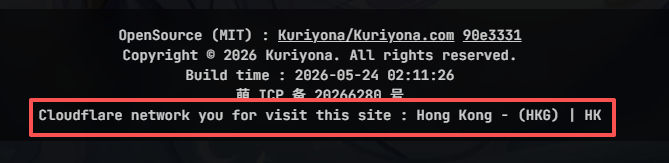
Scroll to the bottom of this website, and you should see the actual display style.
Implementation Approach
For websites proxied by Cloudflare, visiting {domain}/cdn-cgi/trace returns information about the Cloudflare network currently being used. Example output:
fl=582f239
h=kuriyona.com
ip=64.90.0.218
ts=1779555940.000
visit_scheme=https
uag=Mozilla/5.0 (Windows NT 10.0; Win64; x64) AppleWebKit/537.36 (KHTML, like Gecko) Chrome/149.0.0.0 Safari/537.36 Edg/149.0.0.0
colo=HKG
sliver=none
http=http/3
loc=HK
tls=TLSv1.3
sni=plaintext
warp=off
gateway=off
rbi=off
kex=X25519MLKEM768
By parsing the colo parameter, we can obtain the current Cloudflare network ID — in this example, HKG.
Now that we have the network ID, we can display the corresponding Cloudflare network name.
Cloudflare Status provides a file that lists the current status information of all Cloudflare networks.
https://www.cloudflarestatus.com/api/v2/summary.json
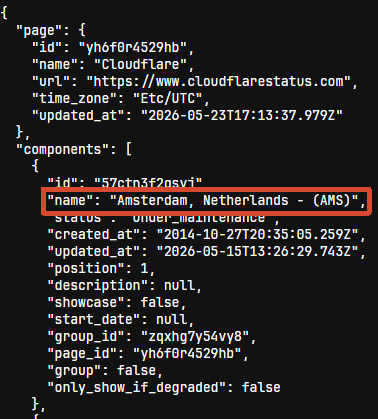
The file content is quite messy, so we need a simple script to extract the formatted information we need.
First, filter the name fields of network components using a simple regular expression (^[A-Za-z\s,]+-\s*\(([A-Z]{3})\)$), then simplify the data structure. (Here, we use the ky library to fetch data.)
const res = await ky.get('https://www.cloudflarestatus.com/api/v2/summary.json').json();
const result = res.components
  .filter((c) => REGEX.test(c.name))
  .map((n) => ({
    name: n.name,
    code: n.name.match(/^[A-Za-z\s,]+-\s*\(([A-Z]{3})\)$/)?.[1],
  }));
Combined with the network ID obtained earlier, we can now get the actual network node name.
Code Implementation
The actual code used on this site can be seen in useCloudflareStatus.tsopen_in_new
Below is a complete TypeScript implementation:
import ky from 'ky';

const REGEX = /^[A-Za-z\s,]+-\s*\(([A-Z]{3})\)$/;

interface NodeInfo {
  name: string;
  code: string | undefined;
}

interface TraceData {
  colo?: string;
  loc?: string;
  [key: string]: string | undefined;
}

interface CloudflareStatusResult {
  nodesData: NodeInfo[] | undefined;
  traceData: TraceData | undefined;
  currentNodeName: string | undefined;
  location: string | undefined;
}

export async function getCloudflareStatus(): Promise<CloudflareStatusResult> {
  // Fetch node data
  const nodesResponse = await ky.get('https://www.cloudflarestatus.com/api/v2/summary.json').json();
  const nodesData = nodesResponse.components
    .filter((c) => REGEX.test(c.name))
    .map((n) => ({
      name: n.name,
      code: n.name.match(REGEX)?.[1],
    }));

  // Fetch trace data
  const traceText = await ky.get('https://kuriyona.com/cdn-cgi/trace').text();
  const traceData = Object.fromEntries(
    traceText
      .split('\n')
      .filter((line) => line.includes('='))
      .map((line) => line.split('=')),
  ) as TraceData;

  // Determine current node name
  const currentNodeName = nodesData.find((n) => n.code === traceData?.colo)?.name;

  const location = traceData?.loc;

  return {
    nodesData,
    traceData,
    currentNodeName,
    location,
  };
}
Other language versions
OpenSource (MIT) : Kuriyona/Kuriyona.com 7f94547
Copyright © 2026 Kuriyona. All rights reserved.
Build time : 2026-09-12 16:16:33